INDEPENDENT PROFILE · MESSAGES & CHANNEL COORDINATION
Hospitable: pricing, plans and fit.
A starting point for hosts who want guest conversations and channel calendars in one place.
When Hospitable is worth checking
Worth a look: A host whose recurring problem is guest communication across channels.
Skip it if: You only need a turnover checklist or cannot justify setup time.

Essentials $0; Host $29/month basePublic price, checked Nov 4, 2026
Paid link: we may earn a commission. It never changes our order. How links work
Start with the least plan that covers the job
Essentials documents calendar coordination, a unified inbox and scheduled messages. A free base subscription does not establish every advanced rule or device workflow. Direct booking sites and native smart devices select Professional in our estimate.
| Active properties | Paid messaging path | Direct site / native-device path |
|---|---|---|
| 1 | $29/month base estimate | $59/month base estimate |
| 2 | $39/month base estimate | $59/month base estimate |
| 5 | $104/month base estimate | $104/month base estimate |
These are plan estimates, not a performance test. Keep the current setup when it already handles the task. Use the one-property acceptance checklist.
One task to verify
Preview a booking inquiry rule
Hospitable documents shortcodes in templates and a preview that does not send a guest message. A preview needs an applicable inquiry or reservation.
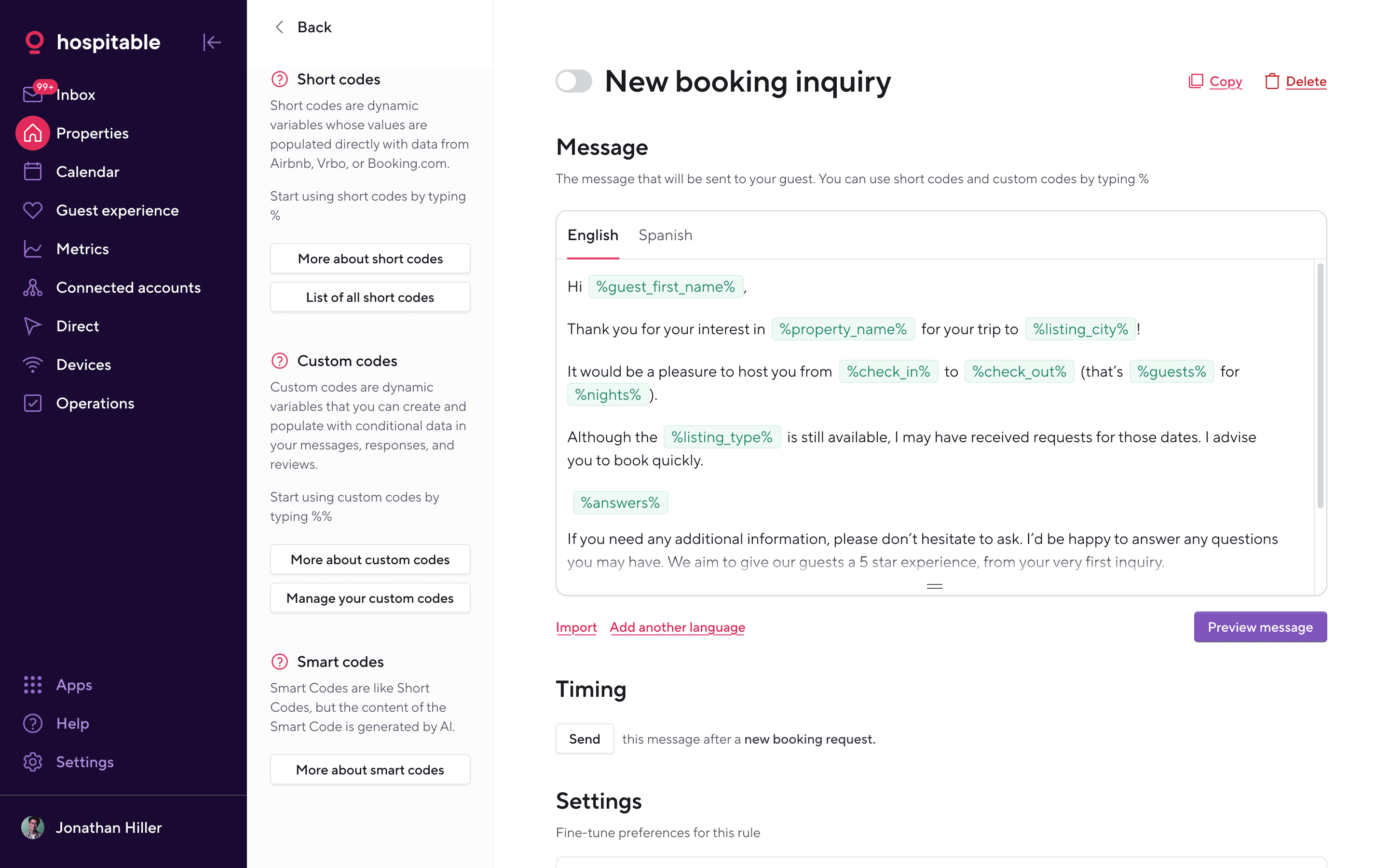
What to try: Use an authorized test reservation to preview the right language and booking stage. Check a changed arrival and a missing detail. Keep the rule off until the rendered text passes.
Without a new subscription: Keep two channel-native replies and an explicit handoff for exceptions if you can maintain them reliably.
Read Hospitable’s workflow documentationWhat the documentation supports
Questions to settle before you subscribe
Use these original acceptance prompts in your own authorized trial. They describe work to verify, not tests HostMetrio performed.
Which message rules need a paid plan?
Ask for evidence: Demonstrate the exact rule, channel and changed-date behavior in an authorized trial.
Until then: Keep platform templates and a human exception queue until accepted.
What happens after a channel disconnects?
Ask for evidence: Review cancelled or unsent messages and the documented manual recovery process.
Until then: Assign one person to check upcoming arrivals outside the scheduler.
Does the required device work on this plan?
Ask for evidence: Verify Professional scope, exact model, region and device charges separately.
Until then: Use the existing authorized entry process until safely verified.
What we did and didn’t check
We read the official plan documentation linked here. We have not tested sync reliability, message accuracy, customer support, devices or production bookings. Advertised capability is evidence of a vendor’s description, not proof of its performance.
Confirm your exact plan, region, channels, property count, required add-ons and billing period. A subscription that looks inexpensive can still leave out the task you need. The manual option remains a valid alternative if your current workflow is reliable.